
This document is relevant for: Inf2, Trn1, Trn2, Trn3
Direct HBM Tensor Allocation with Neuron#
This topic provides an overview and usage examples for directly allocating tensors into High Bandwidth Memory (HBM) on AWS Neuron devices using the Neuron Runtime with PyTorch.
Overview#
Device identifier: On Trainium/Inferentia instances, Neuron devices are identified in PyTorch through the names:
privateuseoneorneuron. These names can be used interchangeablyDirect HBM allocation: Allows tensors to be allocated directly into High Bandwidth Memory (HBM) on Neuron devices
Performance optimization: Eliminates memory transfer overhead between CPU and device memory
Background#
PyTorch has many different devices which it dispatches ops (like add, matmul, to) to,
privateuseoneis one of these devices, we utilize this and register our backend using this PyTorch interface, and we rename it asneuron. If a tensor is created or moved to a device, PyTorch will dispatch the allocation operation to that device. For instance, if a tensor is created onneuron:0specifically, the Neuron Runtime will handle the allocation, and will allocate the result on device instead of CPU.Diagram 1: Device registration and allocation flow
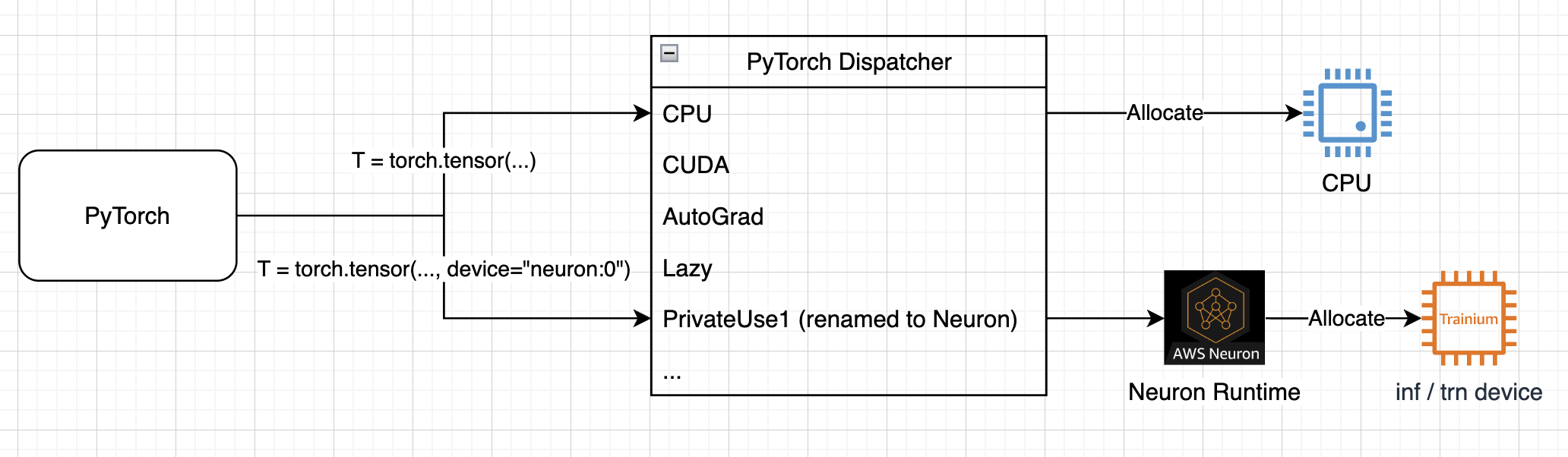
Diagram 2: Tensor allocation behaviour
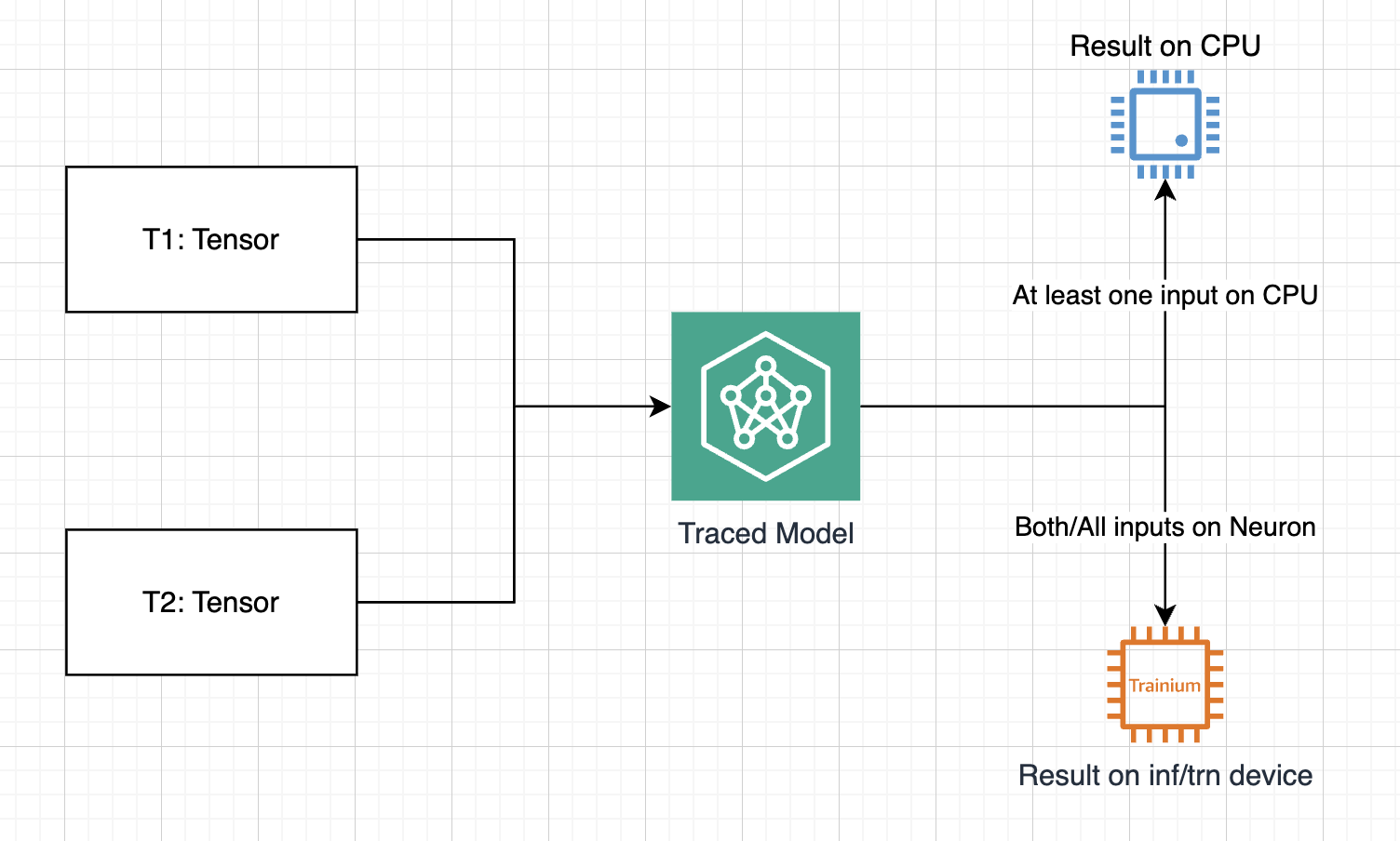
Device Placement Behavior#
Critical Rule#
All-or-nothing: ALL inputs must be on
neuron:0for outputs to remain on deviceCPU fallback: Any CPU input causes ALL outputs to move to CPU
Why This Matters#
Chained operations: Enables efficient multi-model pipelines without CPU roundtrips
Reduced latency: Eliminates expensive device-to-CPU transfers
Memory efficiency: Better utilization of 32GB (trn1) / 96GB (trn2) HBM available on Trainium instances
Usage Examples#
Basic Usage - All Inputs on Device#
traced_model = '{your-model-here}'
torch_neuronx.move_trace_to_device(traced_model, 0)

# Single input
input_tensor = torch.rand([1, 3, 224, 224], device="neuron:0")
output = traced_model(input_tensor)
print(output.device)  # device(type='neuron', index=0)

# Multiple inputs
a = torch.rand([2, 2], device="neuron:0")
b = torch.rand([2, 2], device="neuron:0")
output = traced_model(a, b)
print(output.device)  # device(type='neuron', index=0)
Mixed Device Inputs - Shows Fallback#
a = torch.rand([2, 2], device="neuron:0")
b = torch.rand([2, 2], device="cpu")  # One CPU tensor
output = traced_model(a, b)
print(output.device)  # device(type='cpu') - falls back to CPU
Efficient Model Chaining#
input_data = torch.rand([1, 256], device="neuron:0")
intermediate = traced_model1(input_data)    # stays on device
final_output = traced_model2(intermediate)  # stays on device
Best Practices#
Keep all tensors on same device: Ensure all inputs are on
neuron:0to avoid CPU fallbackMonitor HBM usage: Be aware of HBM limits on Trainium instances (32GB for trn1, 96GB for trn2)
Verify device placement: Check
tensor.deviceto confirm expected placement
Compatibility#
Works with: All
torch_neuronx.tracemodels, dynamic batching,move_trace_to_deviceLimited by: Available HBM memory
This document is relevant for: Inf2, Trn1, Trn2, Trn3