
This document is relevant for: Trn2, Trn3
Get started with Neuron Observer on Amazon EKS#
Install Neuron Observer on your Trainium nodes, verify it with the nobs CLI, export metrics to Amazon CloudWatch, and make metrics available to Prometheus and Grafana.
Time to complete: ~25 minutes.
Note
Neuron Observer is in public beta. APIs, metric names, and installation steps can change before general availability.
Overview#
Install Neuron Observer in your Trainium cluster with a Helm chart. Verify the components, inspect a node with the nobs CLI, and query its metrics in your observability backends.
In this quickstart, you:
Install Neuron Observer and an AWS Distro for OpenTelemetry (ADOT) collector across your Trainium nodes.
Confirm that the pods are running with
kubectland that the daemon is ready withnobs status.Inspect device health and metrics on a node with
nobs.Export metrics to Amazon CloudWatch and make them available to Prometheus and Grafana.
Prerequisites#
An Amazon EKS cluster with Trainium 2 (Trn2) or Trainium 3 (Trn3) node groups, with the Neuron driver loaded and the Neuron device plugin installed. This quickstart is validated for Trn2 and Trn3 nodes.
The ADOT EKS add-on for CloudWatch or AMP export and, for the Prometheus path, Prometheus and Grafana in-cluster. See How to install and configure Neuron Observer on Amazon EKS for the full prerequisite list and one-time setup.
helm3.8+ andkubectlconfigured for the cluster.
Set up Neuron Observer metrics#
Complete steps 1 through 4 to install Neuron Observer, verify it, inspect a node, and query its metrics in your observability backends.
Step 1: Install Neuron Observer#
Deploy the Observer daemon and an ADOT collector across your Trainium nodes.
The command assumes that the one-time prerequisites are already in place. It installs the per-node daemon (DaemonSet, port 7001), a co-located ADOT collector for CloudWatch export, and a PodMonitor for the daemon’s native Prometheus endpoint. It also enables CloudWatch export and Prometheus scraping.
# Install the per-node daemon (DaemonSet, port 7001), export through
# a co-located ADOT collector to CloudWatch, and enable Prometheus scraping.
helm upgrade -i neuron-observer oci://public.ecr.aws/neuron/neuron-helm-chart \
  --version 1.10.0 \
  --create-namespace --namespace neuron-observer \
  --set devicePlugin.enabled=false --set npd.enabled=false \
  --set observer.enabled=true \
  --set observer.daemon.config.export.enabled=true \
  --set observer.otelDaemonCollector.pipelines.cloudwatch.enabled=true \
  --set observer.monitoring.podMonitor.enabled=true \
  --set observer.monitoring.releaseLabel=prometheus \
  --set observer.monitoring.grafanaDashboards.enabled=true \
  --set observer.otelDaemonCollector.awsRegion=us-west-2
Note
For the full prerequisite setup (the ADOT operator, optional in-cluster Prometheus, and the IAM role for CloudWatch or AMP) and the individual Prometheus, AMP, and CloudWatch options, see How to install and configure Neuron Observer on Amazon EKS.
Step 2: Verify the Observer components are running#
Confirm that the daemon and collector pods are running and that the daemon is ready.
# Daemon pods (one per Trainium node)
kubectl get pods -n neuron-observer \
  -l app.kubernetes.io/name=neuron-observer -o wide

# ADOT-managed OTel collector pods
kubectl get pods -n neuron-observer \
  -l app.kubernetes.io/managed-by=opentelemetry-operator

# Per-node liveness / readiness
kubectl exec -n neuron-observer <daemon-pod> -- nobs status
nobs status reports ready: true after the daemon completes its first collection cycle.
Step 3: Inspect a node with the nobs CLI#
Use the nobs CLI to inspect the device information and metrics that Observer collects on a node.
# Discovered Neuron devices + health verdict
kubectl exec -n neuron-observer <daemon-pod> -- nobs devices

# Per-device metrics, table view
kubectl exec -n neuron-observer <daemon-pod> -- nobs metrics --scope device

# Same data, JSON — pipeable to jq / control-plane scripts
kubectl exec -n neuron-observer <daemon-pod> -- nobs metrics --scope device -o json
For the full nobs command reference, see Reference: Neuron Observer metrics and faults.
Step 4: Query your metrics#
Query CloudWatch and Prometheus to confirm that they receive metrics. Step 1 enabled CloudWatch export and Prometheus scraping. In CloudWatch or Grafana, view cluster health, filter by node or device, and create alerts for device errors, ECC events, utilization, link health, and health state.
# CloudWatch CLI example for getting metrics.
# Uncorrectable HBM ECC events are aggregated per node, so this metric
# carries the instance_id dimension only (no per-device dimension).
# CloudWatch metric names use the dotted form.
aws cloudwatch get-metric-statistics \
  --namespace NeuronObserver \
  --metric-name neuron.device.mem_ecc_uncorrected.sum \
  --dimensions Name=instance_id,Value=<instance-id> \
  --statistics Sum --period 60 \
  --start-time "<one-hour-ago-UTC>" --end-time "<current-time-UTC>"
# PromQL
# Cluster-wide: total uncorrectable HBM ECC events across the fleet.
# ECC counters use the neuron_device_ prefix with a _total suffix.
sum(neuron_device_mem_ecc_uncorrected_sum_total)

# One node: ECC is aggregated per node, so it carries instance_id only
# (no neuron_device_index label).
neuron_device_mem_ecc_uncorrected_sum_total{instance_id="<instance-id>"}

# One device on one node: core-scoped metrics carry the
# neuron_device_index label, so you can drill down.
neuron_core_utilization_avg{
  instance_id="<instance-id>", neuron_device_index="3"
}
Confirmation#
Neuron Observer is now monitoring your Trainium nodes. You verified it with nobs status, inspected devices and metrics with nobs, exported metrics to CloudWatch, and made metrics available to Prometheus and Grafana.
Neuron Observer includes CloudWatch and Grafana dashboard definitions for the metrics configured in Step 1:
Amazon CloudWatch — The cluster overview shows node and device counts, NeuronCore utilization, inference activity, memory usage, hardware errors, device health, and EFA reliability. The per-node diagnostics dashboard shows these signals, including EFA metrics, for one node.
Prometheus and Grafana — The package provides three dashboards: cluster overview, device health, and node diagnostics. The device health dashboard shows health-state counts and unhealthy devices.
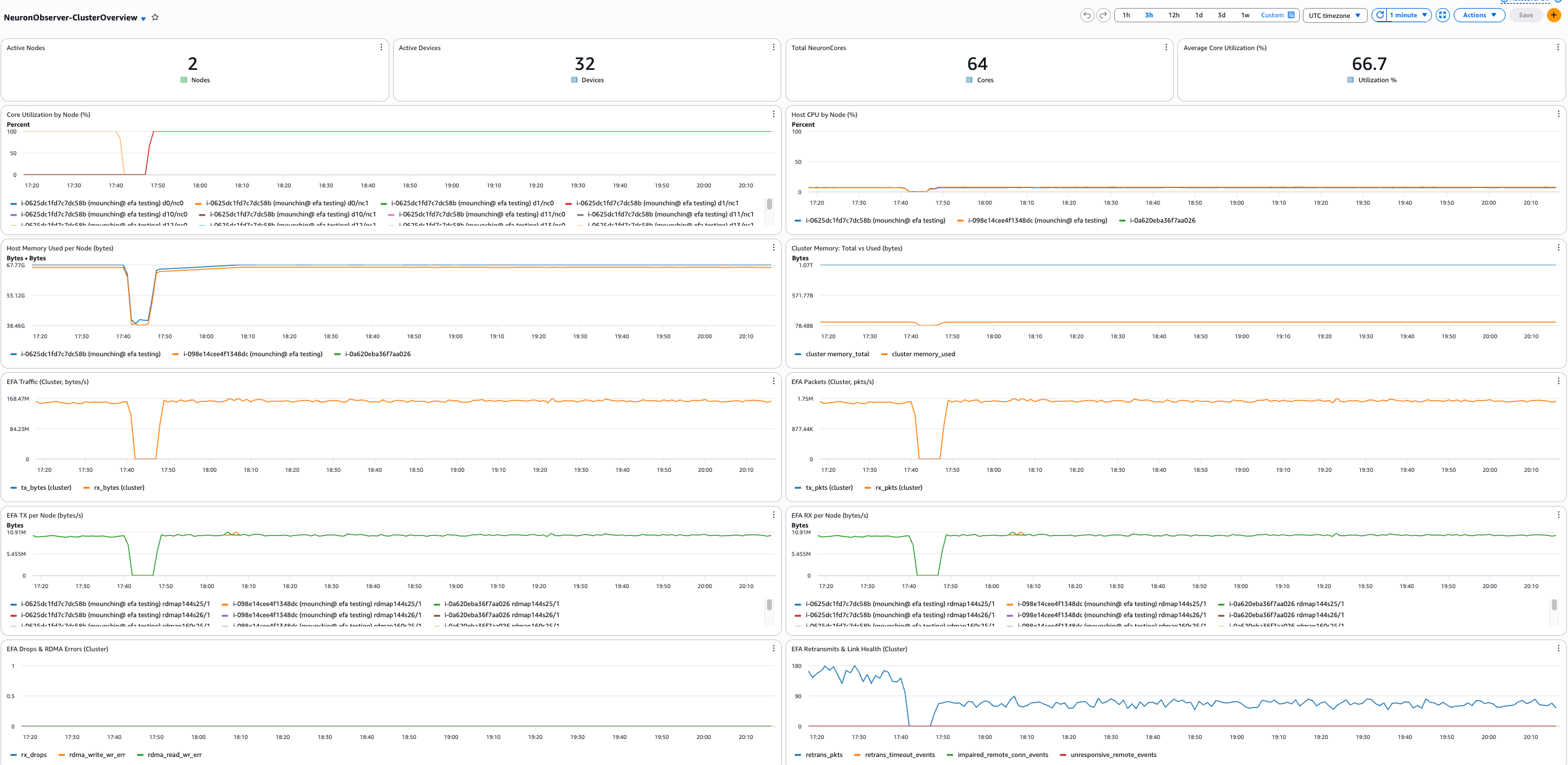
Fig. 87 Sample Amazon CloudWatch dashboard.#
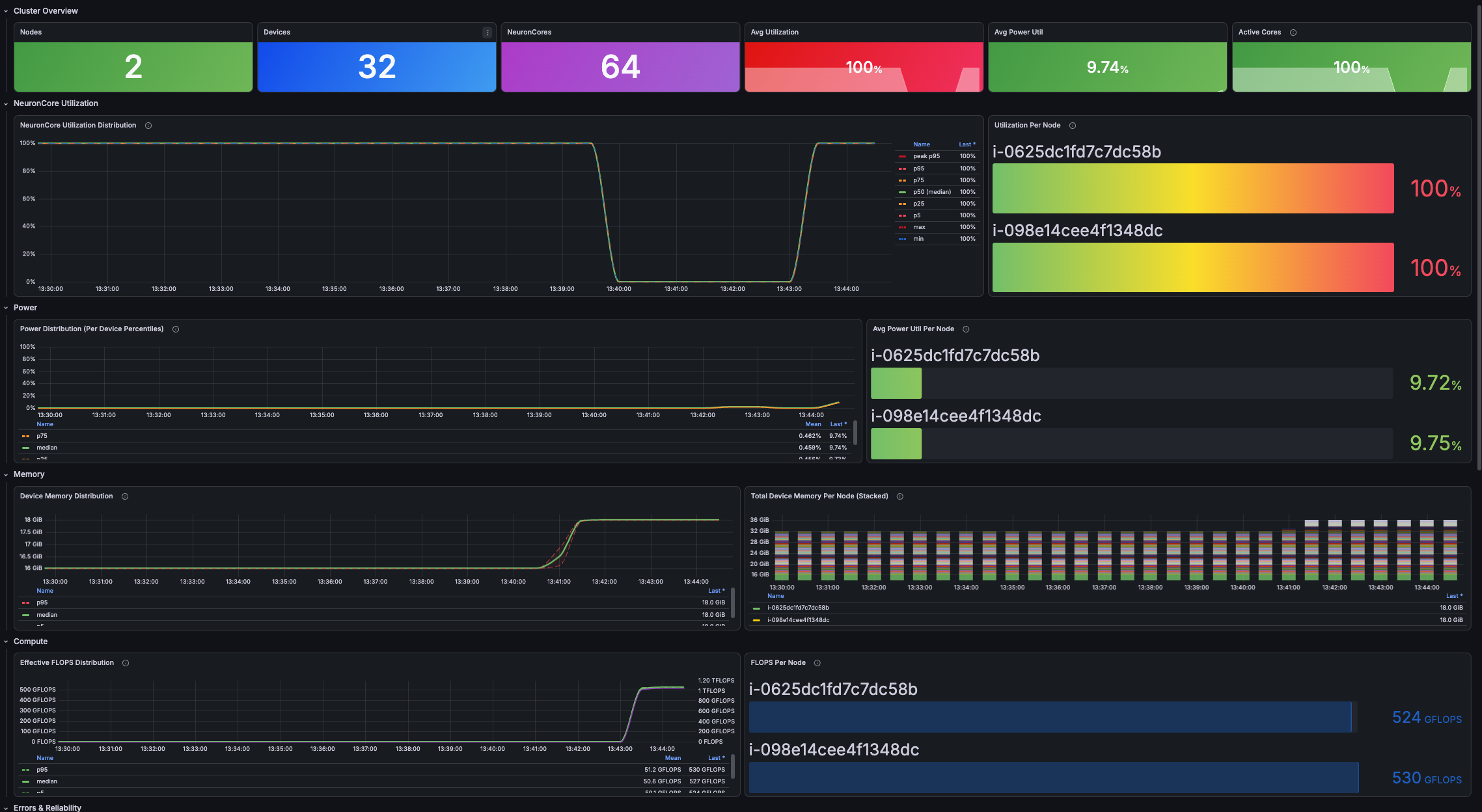
Fig. 88 Sample Prometheus and Grafana dashboard.#
Troubleshooting#
For common installation and export issues, FAQs, and public beta limitations, see the Troubleshooting and FAQs guide.
Next steps#
Reference: Neuron Observer metrics and faults — the metrics and fault categories Neuron Observer reports.
How to install and configure Neuron Observer on Amazon EKS — installation and export pipeline options.
Reference: Neuron Observer configuration — the Helm chart configuration values, their types, and defaults.
This document is relevant for: Trn2, Trn3