
This document is relevant for: Inf2, Trn1, Trn2, Trn3
Capture PyTorch profiles with Neuron Explorer#
PyTorch profiling uses the standard torch.profiler.profile API extended with a NeuronConfig object that controls Neuron-specific data collection. For related Explorer viewers, see System Trace Viewer.
Before you capture, set the compile-time variables in Setup (all methods). For other frameworks and capture methods, see Capture profiles with Neuron Explorer. To view the profile, see Step 5 of Get Started.
How it works#
Pass two activities to torch.profiler.profile:
ProfilerActivity.CPU— framework-level CPU operations (PyTorch dispatch, Python stacks)ProfilerActivity.PrivateUse1— Neuron runtime and device activity (controlled by NeuronConfig)
Both are required for a complete CPU-to-device view.
NeuronConfig profile modes#
Each mode controls what gets collected and what output files are produced:
Mode |
What it captures |
Output files |
|---|---|---|
|
Hardware-level NeuronCore instructions |
|
|
Neuron Runtime system-level trace |
|
|
Host CPU utilization |
|
|
Host memory usage |
|
Warning
ProfileMode.DEVICE reserves approximately 5 GB of HBM on Trn2 for storing hardware notifications. Omit it if you don’t need instruction-level device traces.
NeuronConfig parameters#
Parameter |
Description |
|---|---|
|
List of |
|
Maximum number of trace events per NeuronCore. If a run generates more events than this, the oldest are dropped — see Handling dropped events and partial profiles. |
|
Comma-separated NeuronCore indices or ranges to capture (for example, |
|
Directory for Neuron Runtime trace output files. |
|
Path to the NEFF cache directory. When set, cached NEFFs are copied into the profile artifact directory on stop instead of creating additional copies at load time. |
|
When |
Supported torch.profiler.profile arguments#
The following standard torch.profiler.profile arguments are supported when used with
NeuronConfig:
scheduleon_trace_readyrecord_shapeswith_flopsprofile_memorywith_stack
Basic example#
import torch
from torch.profiler import profile, ProfilerActivity
from torch_neuronx.profiling import NeuronConfig, ProfileMode, NeuronProfiler

# Configure Neuron profiling
neuron_config = NeuronConfig(
    modes=[ProfileMode.DEVICE, ProfileMode.RUNTIME],
    profile_output_dir="./profile_output",
)

# NeuronProfiler.export_trace() places the framework trace
# in the same directory as Neuron system traces
exporter = NeuronProfiler(neuron_config)

# IMPORTANT: Warm up first (3+ iterations)
with torch.no_grad():
    for _ in range(3):
        model(x)

# Profile your workload
with profile(
    activities=[ProfilerActivity.CPU, ProfilerActivity.PrivateUse1],
    experimental_config=neuron_config,
    on_trace_ready=exporter.export_trace,
) as prof:
    with torch.no_grad():
        model(x)
        torch.neuron.synchronize()  # Ensures device finishes before export
Why torch.neuron.synchronize()? Neuron is asynchronous, so the forward call queues work and returns immediately. Without sync, the profiler may export before the device finishes executing, producing an incomplete trace.
Multi-rank example with host collective communication#
The following demonstrates profiling a distributed workload that overlaps compute and collective communication:
import os
import torch
import torch.distributed as dist
import torch_neuronx
from torch_neuronx.profiling import NeuronConfig, ProfileMode, NeuronProfiler
from torch.profiler import ProfilerActivity, profile, record_function

def main():
    dist.init_process_group(backend="neuron")
    rank = dist.get_rank()
    device = torch.device("neuron")
    cc_stream = torch_neuronx.Stream(device)

    exp_config = NeuronConfig(
        modes=[ProfileMode.DEVICE, ProfileMode.RUNTIME,
               ProfileMode.CPU_UTIL, ProfileMode.HOST_MEMORY],
        profile_output_dir="./profile_host_cc",
        max_events_per_nc=100000,
        capture_enabled_for_nc="0,1",
    )
    exporter = NeuronProfiler(exp_config)

    with (
        profile(
            activities=[ProfilerActivity.CPU, ProfilerActivity.PrivateUse1],
            experimental_config=exp_config,
            with_stack=True,
            on_trace_ready=exporter.export_trace,
        ) as prof,
        record_function("model_inference"),
    ):
        a = torch.randn(4096, 4096, device=device, dtype=torch.float32)
        b = torch.randn(4096, 4096, device=device, dtype=torch.float32)
        t = torch.randn(4 * 1024 * 1024, device=device, dtype=torch.float32)

        # Warmup
        for _ in range(3):
            torch.matmul(a, b)
            with torch_neuronx.stream(cc_stream):
                dist.all_reduce(t)
        torch_neuronx.synchronize()
        dist.barrier()

        # Profiled iterations
        for _ in range(10):
            torch.matmul(a, b)
            with torch_neuronx.stream(cc_stream):
                dist.all_reduce(t)
        torch_neuronx.synchronize()
        dist.barrier()

    dist.destroy_process_group()

if __name__ == "__main__":
    main()
Launch command (Trn2, 4 ranks):
NEURON_RT_NUM_CORES=4 \
NEURON_RT_VIRTUAL_CORE_SIZE=2 \
torchrun \
    --nproc_per_node 4 \
    --rdzv_backend c10d \
    --rdzv_endpoint localhost:29500 \
    --local-ranks-filter 0 \
    --tee 3 \
    your_script.py
Capturing a PyTorch memory snapshot#
To populate the PyTorch Allocator tab of the Memory Viewer, record a memory snapshot while profiling and write it into the profile session directory next to the system trace:
torch_neuronx.memory._record_memory_history()starts recording caching-allocator events, including the Python stack trace of each allocation. Call it before the allocations that you want to analyze.NeuronProfiler.export_snapshot()writes the snapshot into the current session directory, alongsidentrace.pband thetrace.jsonthatexport_trace()writes. Call it after the profiled region, in the same process that recorded the history. The session directory is per rank, so each rank’s snapshot is stored with its own system trace.
Because the snapshot is stored with the system trace, Neuron Explorer processes them together. The runtime stamps each allocation with a trace ID, so Neuron Explorer can link PyTorch allocations to the runtime HBM allocations and add stack traces to the HBM tab.
The following example adds memory snapshot capture to the multi-rank example above. The lines that enable memory snapshot capture are highlighted. For distributed workloads, include rank<N> in the snapshot file name so that Neuron Explorer can identify which rank each snapshot belongs to. If the file name has no rank<N> token, Neuron Explorer assigns the snapshot to rank 0. A single-process run works without the suffix, but in a multi-rank run every snapshot would be assigned to rank 0:
import os
import torch
import torch.distributed as dist
import torch_neuronx
from torch_neuronx import memory as mem
from torch_neuronx.profiling import NeuronConfig, ProfileMode, NeuronProfiler
from torch.profiler import ProfilerActivity, profile, record_function

def main():
    dist.init_process_group(backend="neuron")
    rank = dist.get_rank()
    device = torch.device("neuron")
    cc_stream = torch_neuronx.Stream(device)

    exp_config = NeuronConfig(
        modes=[ProfileMode.DEVICE, ProfileMode.RUNTIME,
               ProfileMode.CPU_UTIL, ProfileMode.HOST_MEMORY],
        profile_output_dir="./profile_memory",
        max_events_per_nc=100000,
        capture_enabled_for_nc="0,1",
    )
    exporter = NeuronProfiler(exp_config)

    # Record caching-allocator history with Python stack traces
    mem._record_memory_history()

    with (
        profile(
            activities=[ProfilerActivity.CPU, ProfilerActivity.PrivateUse1],
            experimental_config=exp_config,
            with_stack=True,
            on_trace_ready=exporter.export_trace,
        ) as prof,
        record_function("model_inference"),
    ):
        a = torch.randn(4096, 4096, device=device, dtype=torch.float32)
        b = torch.randn(4096, 4096, device=device, dtype=torch.float32)
        t = torch.randn(4 * 1024 * 1024, device=device, dtype=torch.float32)

        # Warmup
        for _ in range(3):
            torch.matmul(a, b)
            with torch_neuronx.stream(cc_stream):
                dist.all_reduce(t)
        torch_neuronx.synchronize()
        dist.barrier()

        # Profiled iterations
        for _ in range(10):
            torch.matmul(a, b)
            with torch_neuronx.stream(cc_stream):
                dist.all_reduce(t)
        torch_neuronx.synchronize()
        dist.barrier()

    # Write this rank's snapshot into its session directory, next to ntrace.pb
    exporter.export_snapshot(f"memory_snapshot_rank{rank}.pickle")
    mem._record_memory_history(enabled=False)

    dist.destroy_process_group()

if __name__ == "__main__":
    main()
Launch the script with the same torchrun command as the multi-rank example. Each rank’s session directory then contains a memory_snapshot_rank<N>.pickle file alongside ntrace.pb, trace_info.pb, and trace.json. Open the ./profile_memory directory in Neuron Explorer the same way as any other system profile. No additional processing options are required.
Ensuring NEFFs are in your output directory#
If you don’t see NEFF files in your profile output, they may be in a separate compiler cache.
Set neff_cache_dir in NeuronConfig (or the TORCH_NEURONX_NEFF_CACHE_DIR environment
variable) before running your profiling script to automatically include all relevant NEFFs
in the profiler output directory. This also helps correlate nc_exec_running events to the
relevant NEFF.
os.environ["TORCH_NEURONX_NEFF_CACHE_DIR"] = "./profile_output"
Alternatively, find and copy them manually:
find /tmp/neff_cache -name "*.neff" -printf '%T@ %p\n' | sort -rn | head -5
cp /tmp/neff_cache/<path>/*.neff ./profile_output/<instance_dir>/<session_dir>/
Expected output#
./profile_output/
├── <instance-id>_pid_<pid_0>/
│   └── <timestamp>/
│       ├── cpu_util.pb                 # CPU utilization
│       ├── host_mem.pb                 # Host memory
│       ├── neff_<hash_0>_vnc_0.neff
│       ├── neff_<hash_1>_vnc_0.neff
│       ├── ntrace.pb                   # System profile trace
│       ├── profile_nc_0_session_0.ntff # Device trace (NeuronCore 0)
│       ├── trace.json                  # Framework trace
│       └── trace_info.pb               # System profile metadata
└── <instance-id>_pid_<pid_1>/
    └── ...                             # Same structure per rank
For what each file contains, which files each profile type needs, and how NEFFs and NTFFs are paired, see Neuron Explorer profile files. To check the output for common capture failures, see Verifying your capture.
torch.compile vs eager mode profiling#
Neuron Explorer supports profiling workloads compiled with both torch.compile
and PyTorch eager mode. Eager mode typically produces more NEFFs than
torch.compile. See the next section on how to correlate hardware execution
with the correct NEFF when multiple NEFFs are present.
Correlating hardware execution with the NEFF#
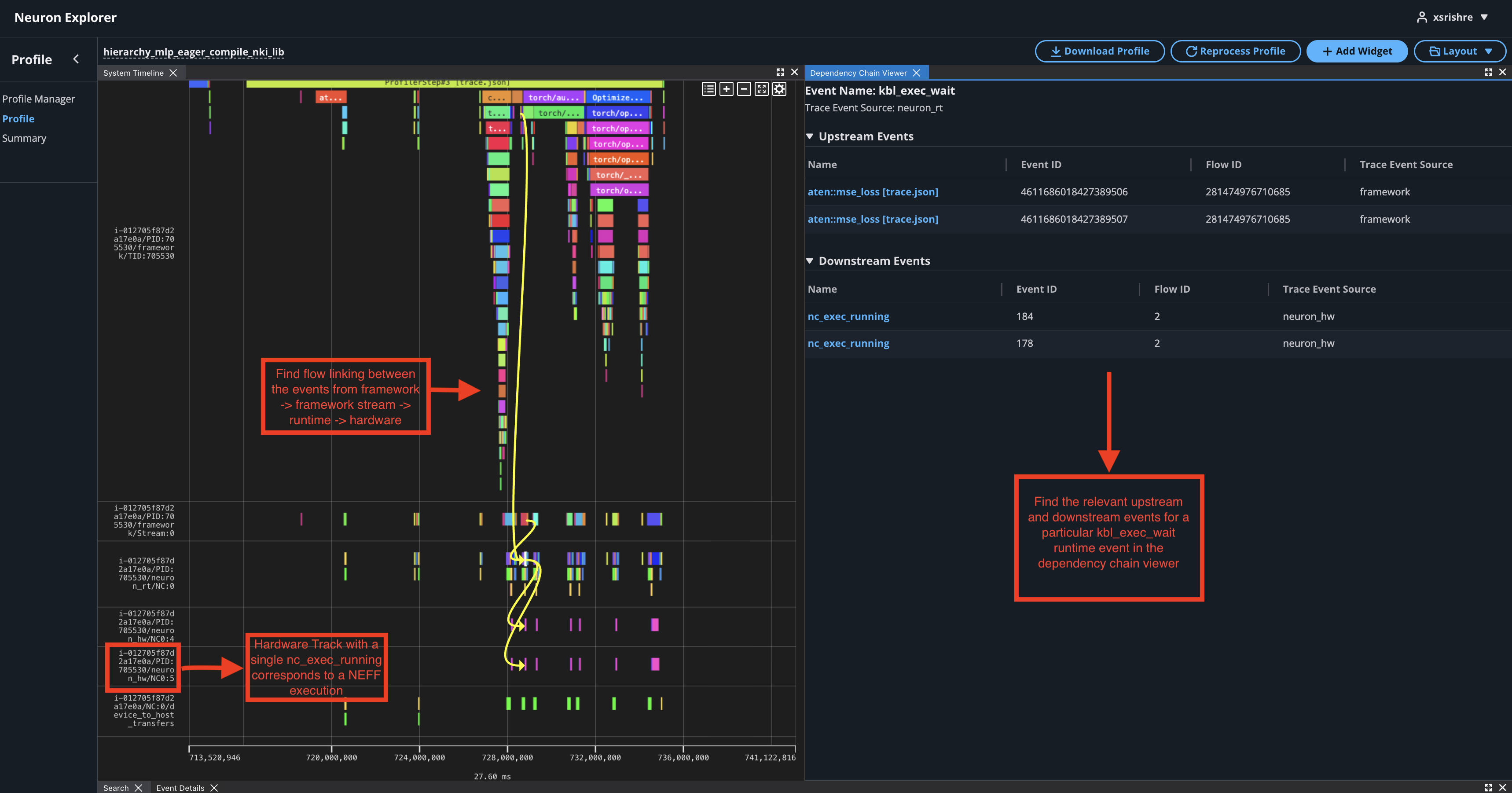
In the case of PyTorch eager profiling, you may come across many neffs. To correlate the hardware execution to the NEFF:
Use the
neff_cache_dirfrom NeuronConfig parameters.In the profile find the events that led to a hardware execution by clicking on a
nc_exec_runningevent in the hardware track of the system profile (has a/neuron_hw/in the track name). Find the full hierarchy of this event by clicking through the associated events in the dependency chain viewer.
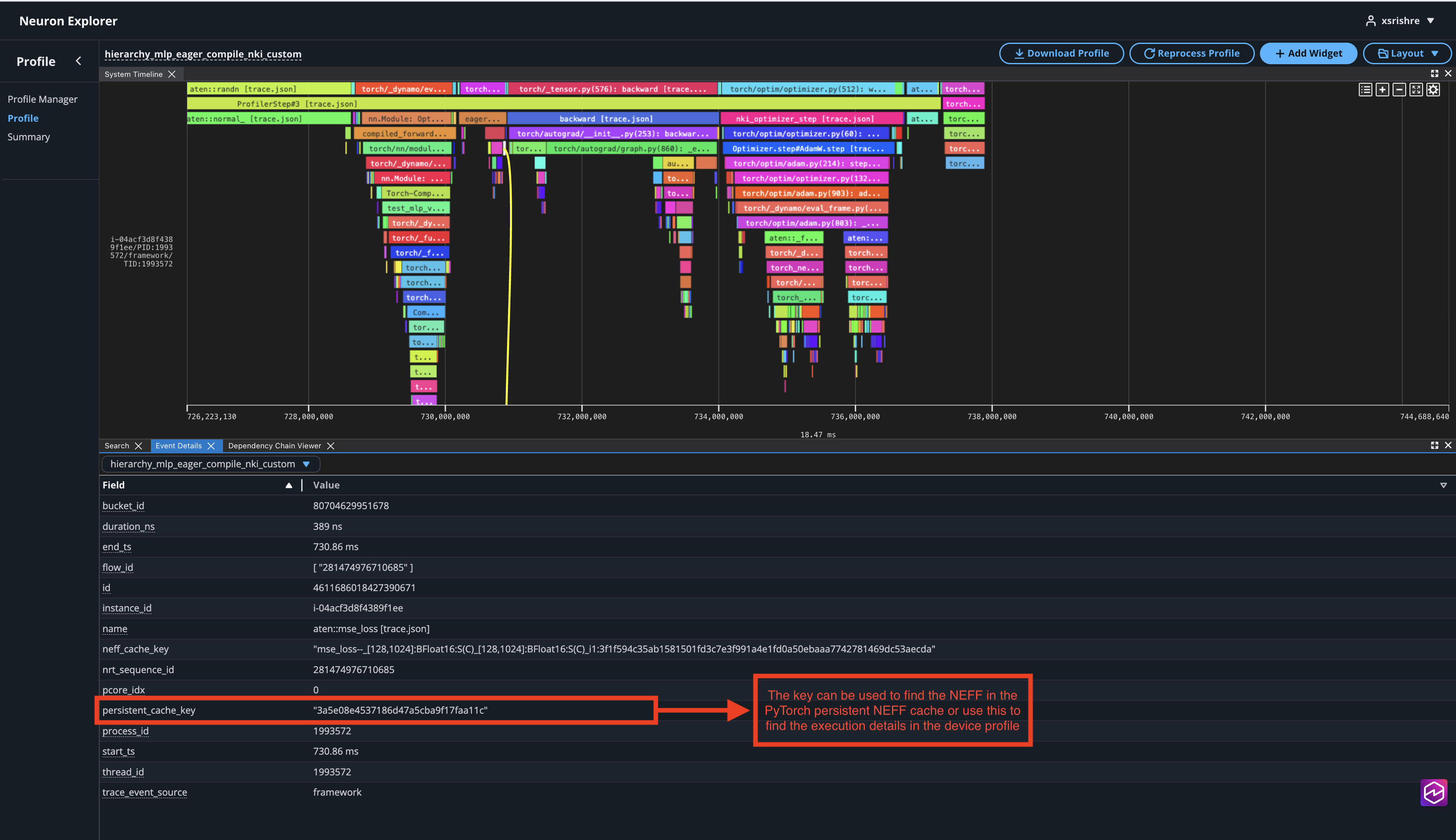
Find the persistent NEFF cache name in the event details of the framework stream event linked to the hardware execution.
This document is relevant for: Inf2, Trn1, Trn2, Trn3