About the Neuron Kernel Interface (NKI)#
This section covers core concepts and the programming models for the Neuron Kernel Interface (NKI) within the AWS Neuron SDK. Whether you’re developing custom kernels or optimizing machine learning workloads, these guides will help you leverage the full capabilities of AWS Neuron devices like Trainium.
The Neuron Kernel Interface (NKI) is a Python-embedded Domain Specific Language (DSL) that gives developers direct access to Neuron’s Instruction Set Architecture (NISA). NKI provides the ease-of-programming offered by tile-level operations and full access to the Neuron Instruct Set Architecture, all within a familiar pythonic programming environment. It also provides the flexibility to implement architecture-specific optimizations rapidly, at a speed difficult to achieve in higher-level DSLs and frameworks. This has enabled developers to achieve optimal performance across a wide spectrum of machine learning models on Trainium, including Transformers, Mixture-of-Experts, State Space Models, and more.
In addition to directly exposing NISA, NKI provides easy-to-use APIs for controlling instruction scheduling, memory management across the memory hierarchy, software pipelining, and other optimization techniques. The APIs are carefully designed to help simplify the code while providing more control and flexibility to developers. This gives developers fine-grained tuning optimizations that work in concert with the capabilities provided by the compiler.
Introducing NKI: Complete Kernel Development Solution#
The Neuron Kernel Interface (NKI) is an open source tool for developing kernels for Trainium hardware. It has three main parts:
The first part is the NKI Programming Interface, which offers two APIs: nki.lang for high-level tile programming (similar to numpy and Triton), and nki.isa for direct access to hardware instructions.
The second part is the NKI Compiler, built on MLIR, which turns NKI kernel code into optimized hardware instructions. It keeps the execution order and memory allocation that developers specify. The third part is the NKI Library (NKI-Lib), which provides ready-to-use optimized kernels that developers can use directly or learn from.
The third is the NKI Compiler, which is available at aws-neuron/nki. Neuron also provides a kernel library with the NKI Library, found at aws-neuron/nki-library. (Both are released under the Apache 2.0 license.)
Using MLIR enables NKI integration with the LLVM ecosystem and compiler research community. NKI’s open-source code lets everyone see how the compilation works, from the Python code to the final hardware instructions. Researchers can try new compiler techniques, framework developers can learn how kernels work with their code, and the community can improve both the compiler and kernel library. If you want to start using NKI, you can find tutorials available at aws-neuron/nki-samples.
For more details on NKI and Neuron open source GitHub repos, see Neuron Open Source Repositories and Contribution.
NKI and Neuron Hardware#
Before learning about NKI, it’s important to understand the hardware where NKI kernels run. NKI is made specifically for AWS Trainium, so let’s look at the architecture your NKI code will use.
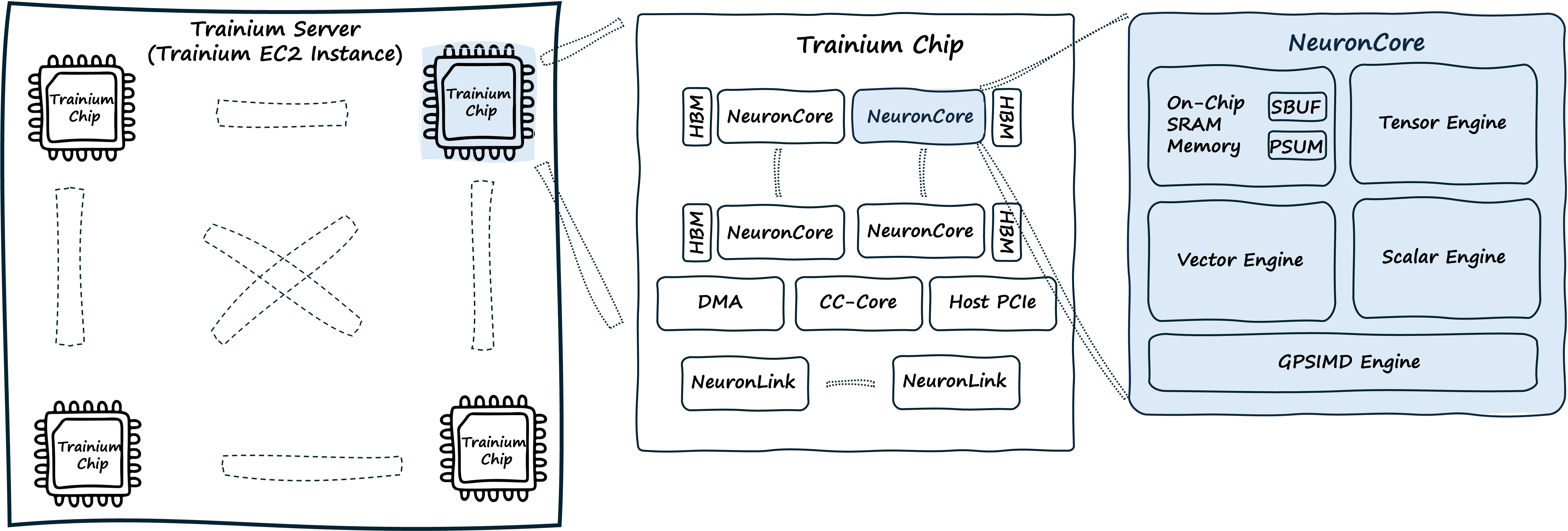
Trainium chips are AI chips built by AWS for AI training and inference. They deliver high performance, use power efficiently, offer flexibility, and can be programmed in different ways, all while reducing costs. Trainium uses groups of large cores (called NeuronCores), each with four specialized engines that work together:
Tensor Engine: Handles matrix multiplications
Vector Engine: Processes multi-input vector operations and reductions
Scalar Engine: Performs element-wise non-linear functions with hardware acceleration
GpSimd Engine: General-purpose programmable processors for custom operations
Trainium devices also have dedicated Collective Communication Engines (CC-Cores) that move data between NeuronCores and between Trainium chips. These engines handle operations like AllReduce and AllGather while computation continues, allowing work to be spread across multiple chips without slowing down the compute engines during gradient synchronization.
The memory system has three levels:
HBM (High Bandwidth Memory): Provides device memory storage
SBUF (State Buffer): On-chip SRAM for active computation, managed by software
PSUM (Partial Sum Buffer): Stores and accumulates matrix multiplication results near the memory
Unlike traditional CPUs and GPUs which adopt hardware managed caches, Trainium software (NKI and Neuron Graph Compiler) explicitly manages the allocation and data movment within the entire memory hierarchy. This architecture allows developers to optimize hardware usage directly, resulting in more consistent and predictable performance. NKI exposes all NISA primitives needed to manage the memory hierarchy.
NKI and Neuron Architecture#
NKI currently supports the following NeuronDevice generations:
Trainium/Inferentia2, available on AWS
trn1,trn1nandinf2instancesTrainium2, available on AWS
trn2instances and UltraServersTrainium3, available on AWS
trn3instances and UltraServers
The documents below provide an architecture deep dive of each NeuronDevice generation, with a focus on areas that NKI developers can directly control through kernel implementation.
Trainium/Inferentia2 Architecture Guide serves as a foundational architecture guide for understanding the basics of any NeuronDevice generation.
Trainium2 Architecture Guide walks through the architecture enhancements when compared to the previous generation.
Trainium3 Architecture Guide covers the enhancements for the next-generation Trainium ML accelerators.
Neuron recommends new NKI developers start with Trainium/Inferentia2 Architecture Guide before exploring newer NeuronDevice architecture.
NKI APIs#
NKI provides two sets of APIs:
The higher-level
nki.langinterface makes memory allocation, tensor indexing, and control of logical neuron core groups easier. Data scientists and ML engineers who know numpy and Triton will find this familiar.The lower-level
nki.isainterface gives direct access to the Neuron Instruction Set Architecture (NISA). This lets operations map directly to hardware instructions with full control over instruction selection, scheduling, and allocation. This helps developers get the most out of the hardware for better performance, throughput, and latency.
These two APIs are designed to work together: nki.lang makes indexing and memory operations simpler, while nki.isa provides the hardware details needed for maximum efficiency.
In the next section, we provide broad view of key concepts for NKI programming, starting with how tensors are allocated, how loop performance is controlled, and memory movement APIs.
Tensor management and indexing#
The nki.lang APIs provide tools for memory allocation, execution scheduling, tensor indexing, and tensor manipulation. The next two examples demonstrate memory allocation and scheduling APIs.
For memory allocation, developers can explicitly control tensor placement in the memory hierarchy. For example:
import nki.language as nl

# Allocate tensor of FP32 elements in SBUF (on-chip scratchpad memory)
# using ndarray call similar to numpy
# like numpy, nl supports ndarray(), zeros() and ones() functions
x_on_chip = nl.ndarray((128, 32, 512), dtype=nl.float32, buffer=nl.sbuf)

# Allocate tensor of FP16 elements in HBM (high-bandwidth memory, off-chip)
y_in_hbm = nl.ndarray(shape, dtype=nl.float16, buffer=nl.shared_hbm)
Scheduling options for loop#
Loops are a key part of tile and tensor programming. NKI offers three ways to write loops that control execution order and determine whether loops are optimized during compilation or depend on runtime values.
Let’s look at three types of loops, which serve as hints to the compiler. The compiler will always make sure your code works correctly, regardless of any optimizations it makes.
Sequential loop (default loops)#
Loops with sequential ranges are loops that might carry dependencies between the result of one loop to the next loop. The NKI compiler does not try to re-order or parallelize the executions of loops, and runs them in sequence order. When in doubt, Neuron recommends you start with sequential loops.
import nki.language as nl

# Sequential range - compiler will assume loop iteration n, *might* depend on
# results from iterations n-1, n-2,...0, and will not try to unroll
# or parallize the code execution
# when in doubt, developers should start with Sequential_range()

for i in nl.sequential_range(8):
    # Compiler will not re-order
    result = process_tile(result_from_previous_loop)
    result_from_previous_loop = result
Affine loop#
Affine loops are a hint that developers can give to the compiler when developer is confident there are no carried dependencies between different loop iterations. This approach allows the compiler to unroll and optimize code ordering between different iterations of the loop to improve performance.
import nki.language as nl

# Affine range - allows compiler optimizations like pipelining and unrolling
for i in nl.affine_range(8):
    # Compiler can reorder and optimize these iterations
    process_tile(i)
On-device (Dynamic) loop#
Some code does not know the number of loop iterations at compile time; or perhaps the code depends on dynamically generated integer values during runtime that decide the number of iterations. In this case, the NKI compiler does not attempt to optimize across loop iterations.
import nki.language as nl

# Dynamic range - runs on device at runtime, not compile-time
lower_bound = register_alloc(0)
upper_bound = register_alloc(10)
for i in nl.dynamic_range(lower_bound, upper_bound):
    process_tensor(t[i])
Direct Hardware Control with nki.isa#
The nki.isa APIs provide low-level operations for computation, data movement, dynamic control flow, and communication between cores. The examples below show compute operations, dynamic control flow, and collective communication APIs.
Matrix operations execute on the Tensor Engine. For instance:
import nki.isa as nisa

# Matrix multiplication on Tensor Engine using nc_matmul
# nc stands for NeuronCore, and matmul is the instruction name
# stationary: [128, 128], moving: [128, 512], output: [128, 512]
# The input arguments must meet NISA requirements as defined
# in the Trainium architecture, such as data types, layout, tile sizes
# and buffer memory types (SBUF or PSUM)
# dst is explicitly defined as instruciton parameter
nisa.nc_matmul(dst=output, stationary, moving)

# Element-wise operations between two tensors
# in this specific example, x and y must have the same partition dimension size
# and the same number of elements per partition.
# Notice the destination (dst) is explicit defined in the instruction parameters
# and op=nl.add defines the actual element-wise operation needed
nisa.tensor_tensor(dst=output, data1=x, data2=y, op=nl.add)
Dynamic control flow uses register-based operations to enable runtime control decisions on the device itself. For example:
import nki.isa as nisa
import nki.language as nl

# this is used to load the scalar register used in the dynamic loop
# memory allocation does NOT perform initialization
cond = nl.ndarray((1, 1), buffer=nl.shared_hbm, dtype=nl.int32)

# explicit initialization is required: initialize cond to zero
isa.dma_copy(dst=cond, src=nl.zeros())

# Allocate a scalar register for control flow
# initialize register to 1
reg = nisa.register_alloc(1)

# Dynamic while-loop with runtime condition
# while condition will check for non-zero integer in register as true condition
while reg:
    # Perform some calculation on device, which updates tensor cond
    # update loop condition from cond
    nisa.register_load(reg, cond)  # Re-evaluate condition
Collective communication primitives enable kernels to coordinate and exchange data across multiple NeuronCores. For example:
import nki.isa as nisa

# Synchronize all cores at a barrier point
nisa.barrier()

# Send and receive data between cores
nisa.sendrecv()
The nki.isa interface gives developers detailed control over AWS Trainium’s hardware. This direct access lets them fine-tune how computations work, manage memory, and optimize when instructions run. By controlling these elements precisely, developers can get the best performance from Trainium by creating custom versions of AI model parts like attention mechanisms, loss functions, and data preprocessing routines.
NKI Open Source Compiler#
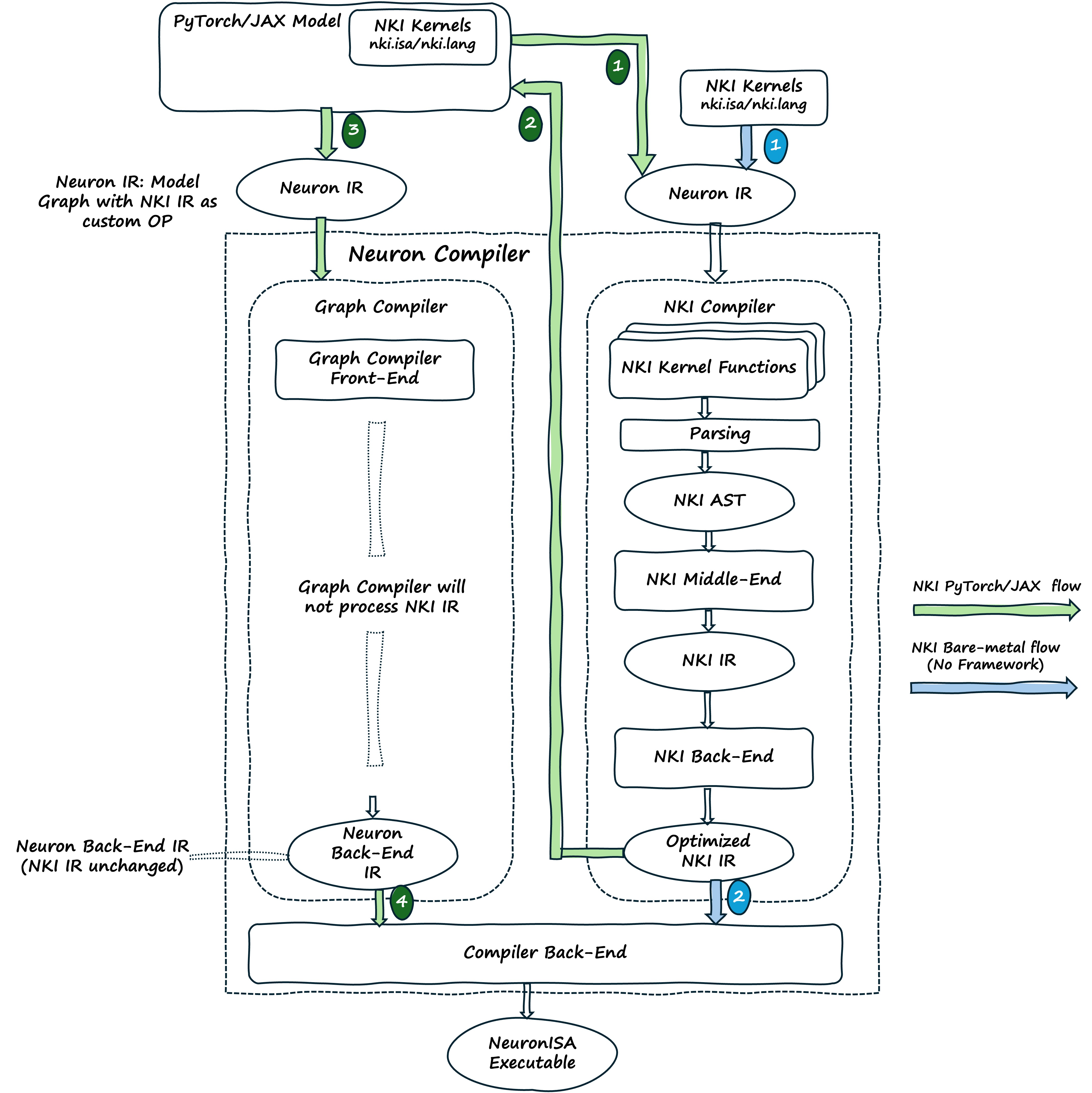
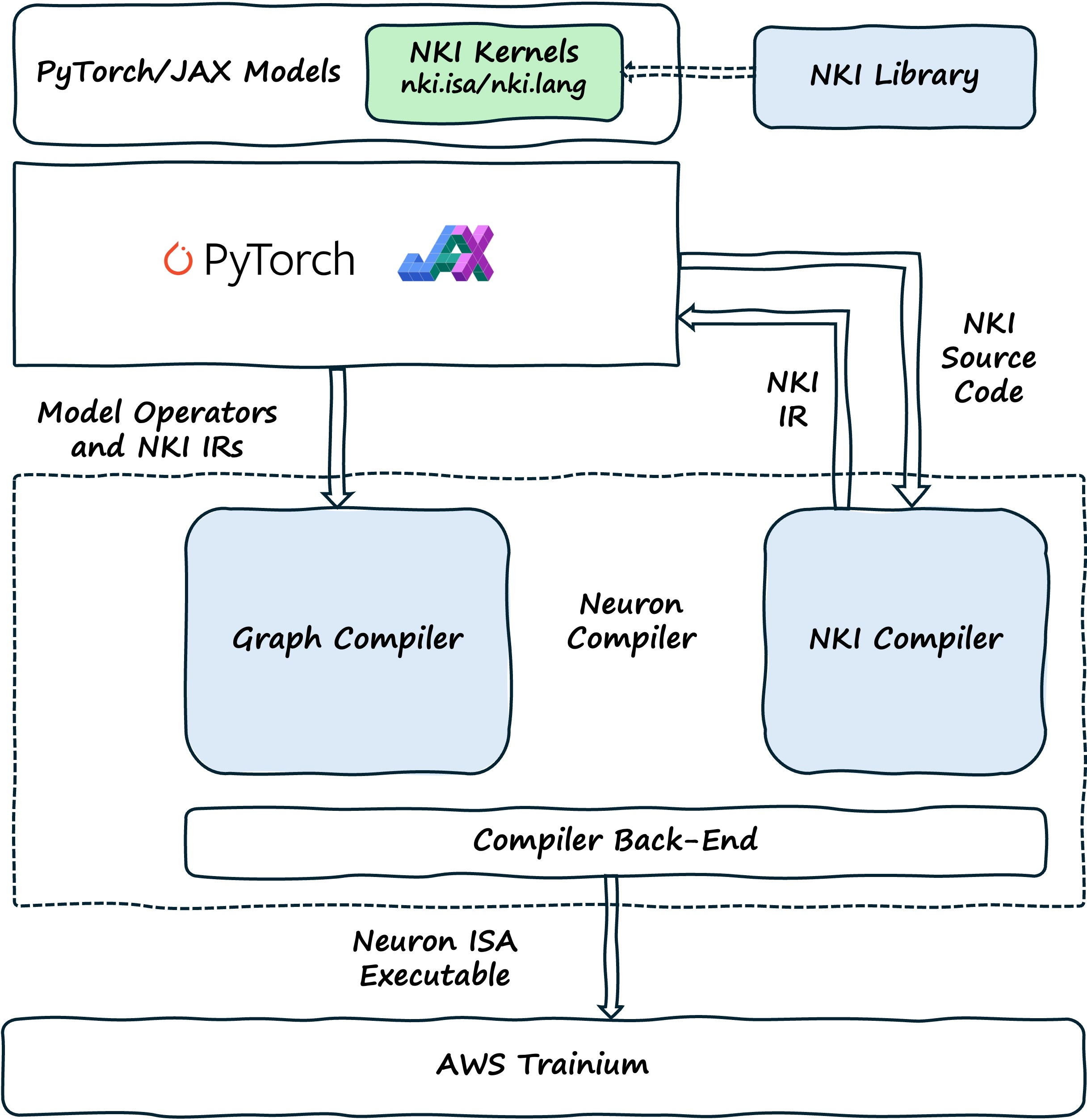
The NKI Compiler, built on MLIR, turns kernel source code into optimized NKI IR (Intermediate Representation). The Neuron Compiler Back-end then turns this NKI IR into NeuronISA instructions. When a framework model includes NKI source code, the framework calls the NKI Compiler to process these kernels separately. The NKI Compiler creates optimized NKI IR that gets added to the larger Neuron IR representing the complete model, which then goes to the Neuron Graph Compiler.
The NKI Compiler processes one kernel at a time, creating NKI intermediate representation (NKI IR). This IR, along with other kernels and compilation graphs, is used to create a Neuron Executable (NEFF). We’ve put the NKI Compiler code on GitHub so performance engineers, researchers, compiler developers, and MLIR enthusiasts can understand how the compilation works and contribute to research or development.
The diagram below shows how PyTorch or JAX models are turned into optimized NeuronISA instructions. When developers create a model with NKI kernels (marked with the @nki.jit decorator), the framework starts tracing the model through the Neuron Backend. During this process, when the framework finds NKI kernels, it calls the NKI Compiler to process them right away. The NKI Compiler creates optimized NKI IR that is saved and referenced by custom-call nodes in the Neuron IR. The framework continues building the complete Neuron IR, adding these custom-call nodes alongside regular model operations. When the Neuron IR is complete, the Graph Compiler processes the entire model, and the Neuron Compiler Back-end generates code for both standard operations and the NKI kernels by turning the referenced NKI IR into NeuronISA instructions.
In PyTorch, the @nki_op decorator handles registration of the custom operation, enabling seamless integration into the framework’s execution model.
For more information, see the NKI Compiler documentation.
NKI Library#
The NKI Library (NKI-Lib) is a collection of open-source, pre-optimized, production-ready kernels for common operations. You can use these kernels directly in your PyTorch or JAX code as regular Python functions. The library has two main purposes:
It gives you immediate performance improvements through optimized implementations
It provides examples that show best practices for memory management, instruction scheduling, and hardware use
Developers can use these kernels as they are or as starting points for creating custom optimizations for specific needs.
For more information, see the NKI Library documentation.
Working with NKI Kernels#
If you’re already running models on Trainium or Inferentia, you’re probably using NKI kernels without realizing it. The Neuron compiler automatically adds optimized NKI kernels for common operations during compilation. Many of these kernels are already part of the standard compilation process. When you use vLLM with the Neuron plug-in, popular models already include NKI kernels. Models in NeuronXDistributed Inference also regularly use NKI kernels for you. In many cases, you get the performance benefits of these kernels without changing any code.
Beyond these automatic optimizations, developers who want more control can use NKI in two more ways. First, you can call existing kernels from the NKI Library directly in your PyTorch or JAX code. This needs only small code changes. You just import the kernel and call it where needed in your model. For example, if you need a faster attention mechanism or a special activation function, you can add the matching NKI Library kernel with just a few lines of code.
# Example: Authoring a custom NKI kernel in PyTorch

import torch
from torch_neuronx import nki_op, nki
import nki.language as nl

# Step 1: Define NKI kernel
@nki.jit
def my_kernel(in_ptr0, out_ptr):
    # ... kernel implementation ...

# Step 2: Register as PyTorch custom operator
@nki_op("mylib::my_op", mutates_args={})
def my_op(x: torch.Tensor) -> torch.Tensor:
    out = torch.empty_like(x)
    my_kernel(x, out)
    return out

# Use in PyTorch code
x = torch.randn(128, device="neuron")
y = my_kernel(x)

# y = my_op(x)
Second, developers can create custom kernels for operations that aren’t in the library or need special optimizations. You can start from scratch using the nki.lang or nki.isa APIs, or you can modify existing kernels from the NKI Library as starting points.
These three approaches (automatic optimization, using library kernels, and creating custom kernels) are widely used across ML frameworks and libraries. Frameworks like PyTorch use NKI kernels through ATen operator dispatch for seamless integration. NxD Inference (NxDI), Optimum Neuron, and vLLM use all three approaches: they benefit from automatic compiler optimizations, directly call kernels from the NKI Library when appropriate, and create custom kernels for their specific needs.
Profiling, Debugging, and Performance Optimization#
Neuron Explorer helps you profile your NKI kernel by making it easier to capture and analyze performance data at both system and device levels. You can collect detailed system profiles that show:
Device utilization (how much each engine is used)
Memory consumption
Communication patterns between cores
For NKI kernels specifically, Neuron Explorer shows source-code level information, helping you find bottlenecks by connecting kernel code directly with device-level profiles. The tool works with familiar framework APIs in both PyTorch and JAX. You can view the results in several ways:
The Neuron Profiler UI
Perfetto integration
JSON export for custom analysis
This makes it easier than ever to optimize your NKI kernel performance.
For a more in-depth example of profiling a NKI kernel with Neuron Explorer, see How to Profile a NKI Kernel and the Neuron Explorer documentation.
Core Concepts#
For details on specific NKI concepts, jump to one of these topics:
Understanding the NKI Language#
Explore core language constructs including loops, indexing, and control flow, explain the memory hierarchy and data representation, and cover tiling and scheduling concepts with examples. Link to the docs for deep diving into optimization techniques like allocation and scheduling.
For a deep dive into the NKI Language, see NKI Language Guide (Beta 2). Otherwise, read up on the core programming concepts below!
Core Programming Model#
NKI uses a sequential programming model where operations run in the order they’re written. However, the compiler may change the order of operations that don’t depend on each other to make the code faster. This approach gives predictable execution while letting the hardware’s multiple compute engines work in parallel behind the scenes.
There’s an important difference between compile-time and runtime execution: * Most NKI code, including print statements, runs during compilation * Other statements, like nki.isa.* function calls, create actual runtime operations on the device
For example:
@nki.jit
def my_function(x: tensor, y: tensor) -> tensor:
    print(f"adding tensors of type {x.dtype} and {x.shape}")  # Compile-time print
    nki.isa.tensor_tensor(output, x, y, op=nki.language.add)  # Runtime
    return output
The print statement shows “adding tensors of type float16 and shape (128,512)” during compilation, not when the code runs on the device. If you want to see output from the device itself, NKI provides a special device_print function.
Value Types and Data Structures#
The NKI language supports six basic value types: * None * Booleans * 32-bit integers * 32-bit floats * String literals * Tensors (references to on-device memory)
It also supports container types like tuples, lists, dictionaries with string keys, and simple user-defined classes. These containers work much like their Python equivalents:
l = [1, 2, 3]
l.append(4.1)
l.extend(("Hello", "List"))
size = l.count()

d = dict()
d['a'] = 1
for k, v in d.items():
    print(k, v)
Tensor Management and Memory#
Tensors are the most important type in NKI. They represent on-chip memory regions with metadata you can query, including dtype, shape, address, offset, pattern, and buffer. The most commonly used fields are dtype and shape, which help with compatibility checking and iteration:
assert x.shape == y.shape, "expecting tensors of the same shape"
for i in range(t.shape[0]):  # Compile-time constant bounds
    my_function(t[i])
You can create tensors using the simple nki.language.ndarray API or more advanced memory management techniques. The basic approach creates tensors with a specified shape, data type, and memory buffer:
t = nl.ndarray((128, 128), nl.float16, nl.sbuf)
u = t.reshape((128, 2, 64))  # Alternative view of same memory
Memory Architecture and Indexing#
The SBUF memory uses a two-dimensional layout with partition and free dimensions. By convention, the first tensor dimension always maps to the partition dimension, while the remaining dimensions are arranged in the free dimension.
Tensor indexing supports integer indexing, slices (start:stop:step), and ellipsis (…) notation, just like NumPy:
u = t[0, 0, 10]        # Single element
u = t[:, 0, :]         # Slice with defaults
u = t[0, ..., :]       # Using ellipsis
u = t[::2, :, ::2]     # Step indexing
Each indexing operation creates a new tensor reference with hardware access patterns you can query:
u = t[0, ...]
print(u.offset)   # Hardware access pattern offset
print(u.pattern)  # Hardware access pattern
Control Flow Constructs#
NKI supports two types of control flow: 1. Static control flow (evaluated at compile-time) 2. Dynamic control flow (executed on the device)
Static control flow includes standard if statements, for loops, and while loops that are unrolled during compilation:
for i in range(len(inputs)):
    if i % 2 == 0:
        nki.isa.nc_transpose(dst=outputs[i], data=inputs[i])
    else:
        nki.isa.reciprocal(dst=outputs[i], data=inputs[i])
The compiler provides special range functions as performance hints: sequential_range(), static_range(), and affine_range(). These don’t change how your code works, but they give the compiler hints about how to optimize it.
Dynamic control flow runs on the Trainium device using register values and a special range function:
# Dynamic loop with static bounds
for i in dynamic_range(10):
    process_tensor(t[i])

# Dynamic loop with register-based bounds
count = nki.isa.register_alloc(count_tensor)
for i in dynamic_range(count):
    process_tensor(t[i])
Dynamic while loops use register conditions and four register management APIs: register_alloc(), register_move(), register_load(), and register_store().
Class Support and Interoperability#
NKI provides basic support for user-defined classes, which must inherit from NKIObject. These classes work similarly to Python dataclasses and can be created with or without the @dataclass decorator:
@dataclass
class C(NKIObject):
    x: int
    y: bool = False

    def toggle(self):
        self.y = not self.y

c = C(1)
c.toggle()
You can create class instances in Python and pass them to NKI kernels, where they’re translated using the object’s dictionary. Check the language guide for more details.
For more details on programming with NKI, see NKI Programming Model (Legacy).
NKI Compiler Architecture and Development#
The NKI language gives kernel writers detailed control over Neuron hardware. By offering low-level APIs that match the hardware instructions, the compiler steps back and lets developers take control. This needs a separate compiler that processes the kernel code and works together with the Neuron Graph compiler to fit kernels into the overall model.
The NKI compiler runs when Python is tracing the code. When the interpreter finds a top-level function with the @nki.jit decorator, it calls the NKI compiler. The compiler reads the function, creates an Abstract Syntax Tree (AST) of the user’s code, and makes a few low-level changes to:
Optimize the code
Allocate memory
Schedule instructions
It then sends the optimized code to the Neuron Graph compiler, which adds it to the overall model and creates the NEFF executable.
The diagram below shows the detailed compilation process inside the Neuron compilers and how they work together to create the final program that runs on Neuron hardware. The NKI Compiler first converts the kernel code into an AST representation for analysis. It then makes a few middle-end and back-end changes to the AST, improving resource allocation and instruction scheduling. This creates optimized NKI IR that gets added back into the overall model.